AD. Gaming has become an essential part of children’s lives, providing entertainment, social interaction, and even educational benefits. With the increasing popularity of gaming consoles, it makes sense to design a bedroom setup that accommodates their favourite pastime while keeping the room stylish, organised, and functional. Whether your child enjoys an immersive experience with a curved monitor or prefers the crisp visuals of an LG monitor, this guide will provide smart design tips for incorporating gaming consoles into their bedroom seamlessly.
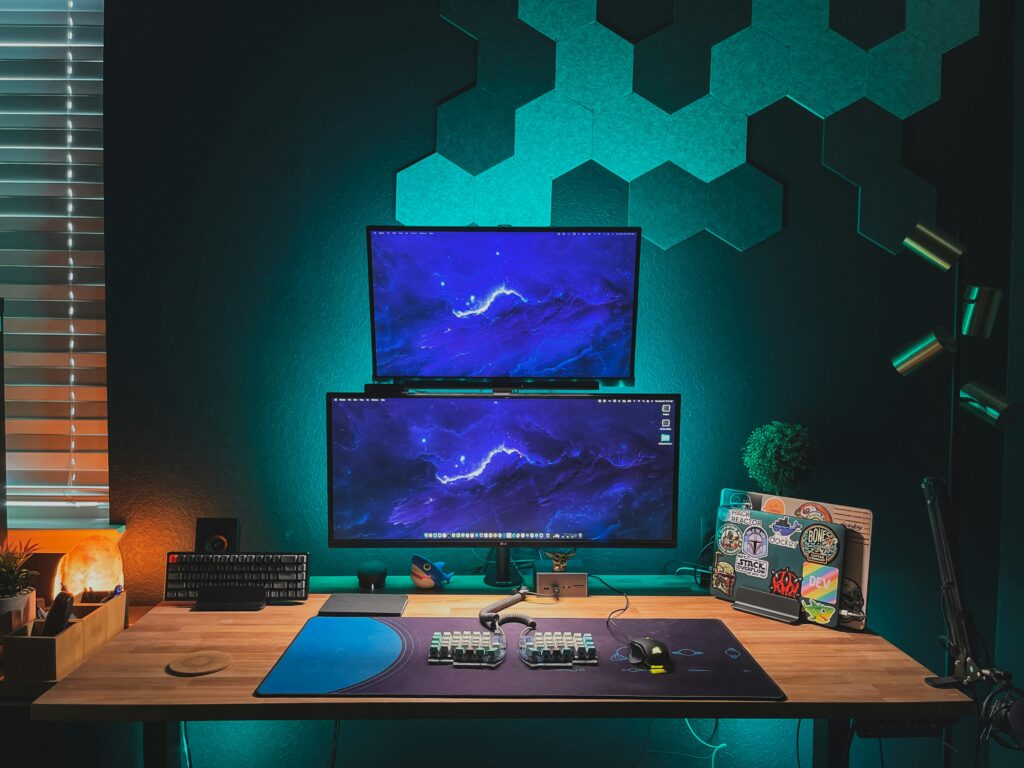
[Photo by Zachary Nelson on Unsplash]
Tips for Blending Gaming Consoles into Kids’ Bedrooms
1. Choose the Right Location for the Gaming Setup
Before setting up the gaming console, consider the best location within the room. The ideal spot should have easy access to power outlets, sufficient ventilation, and minimal glare from windows or lights. Positioning the gaming setup in a corner or against a wall can create a dedicated gaming zone while maximising space. If space allows, placing it near a desk can provide a multi-purpose workstation for gaming, studying, and other activities.
2. Invest in an Ergonomic Gaming Desk and Chair
Comfort is crucial when setting up a gaming area. An ergonomic desk with adjustable height options allows your child to play comfortably while ensuring proper posture. A good-quality gaming chair with lumbar support will prevent strain on their back and encourage healthy sitting habits. When selecting a desk, ensure it has enough space to accommodate a gaming console, monitor, and gaming accessories without feeling cluttered.
3. Incorporate a Wall-Mounted Display for Space Saving
For smaller rooms, mounting the gaming monitor on the wall can free up valuable desk space. A curved monitor mounted at eye level provides an immersive experience while reducing strain on the eyes. If your child prefers an LG monitor, look for models with built-in cable management to maintain a tidy appearance. Wall-mounted shelves below the screen can hold controllers, headsets, and games, keeping everything within easy reach.
4. Create a Cable Management System
Cables can quickly become a tangled mess, making the space look untidy and potentially causing hazards. Use cable organisers, clips, and sleeves to keep wires neatly tucked away. Label each cable for easy identification and consider a power strip with surge protection to keep everything safely powered. If possible, opt for a wireless setup for controllers and other peripherals to minimise cable clutter.
5. Use Smart Storage Solutions
Storage is essential for keeping gaming equipment organised. Here are some smart storage solutions:
- Floating shelves: Ideal for displaying game cases, action figures, or gaming collectibles.
- Storage bins and baskets: Perfect for storing controllers, charging cables, and other accessories.
- Under-bed storage: A great space-saving option for extra gaming gear.
- Drawer organisers: Keep small accessories neatly arranged.
Using labelled containers can help your child keep their gaming area tidy while ensuring they can easily find what they need.
6. Enhance the Gaming Atmosphere with LED Lighting
Lighting can enhance the gaming experience while adding a stylish touch to the bedroom. LED strip lights placed behind the monitor or along the desk can create an immersive ambiance. Consider smart bulbs that allow colour-changing options to match different gaming moods. Wall-mounted neon signs or light panels can also add a futuristic feel to the space.
7. Opt for a Multi-Functional Setup
If your child’s bedroom doubles as a study and play space, a multi-functional setup can help maintain balance. A gaming desk with ample workspace can serve as a study station when needed. A foldable or pull-out table can be used for homework and then tucked away when gaming begins. If space is limited, a loft bed with an integrated desk and gaming area underneath can provide a space-efficient solution.
8. Soundproof the Gaming Zone
Gaming can get noisy, especially during intense multiplayer matches. To minimise noise disruption, consider soundproofing options such as:
- Acoustic panels: Absorb sound and enhance the room’s aesthetics.
- Thick curtains or rugs: Reduce noise reflection.
- Noise-cancelling headphones: Ensure your child enjoys their game without disturbing the rest of the house.
9. Incorporate Personal Touches
A child’s gaming space should reflect their personality and interests. Encourage them to decorate their setup with gaming posters, themed bedding, or figurines from their favourite games. A custom-built shelving unit designed to display their gaming achievements can add a personalised touch to the room.
10. Ensure Proper Ventilation for Gaming Consoles
Overheating can affect gaming consoles' performance and longevity. Ensure there is adequate airflow around the console by keeping it in an open space rather than inside a closed cabinet. If possible, invest in a cooling stand or fan to maintain optimal temperature levels.
11. Keep Health and Wellness in Mind
Gaming is fun, but it’s important to maintain a balance between screen time and other activities. Encourage regular breaks by incorporating a comfortable lounge area in the room where your child can relax away from the screen. Blue light filters or gaming glasses can help reduce eye strain, especially if they game for extended periods.
12. Use Smart Tech for an Upgraded Experience
Smart home technology can take the gaming setup to the next level. Consider voice-controlled assistants like Alexa or Google Home to turn on the gaming console or adjust lighting. Smart plugs can help manage energy usage by automatically switching off devices when not in use. A high-speed internet connection with a dedicated router for gaming can ensure smooth gameplay without lag.
Conclusion
Designing a gaming-friendly bedroom doesn’t have to mean sacrificing style or functionality. With the right furniture, lighting, storage solutions, and ergonomic setup, your child’s gaming space can be both practical and visually appealing. Whether they use a curved monitor for an immersive experience or an LG monitor for high-resolution gameplay, these smart design tips will help create the ultimate gaming haven. By balancing gaming with organisation, comfort, and health considerations, you can ensure your child enjoys their favourite pastime while maintaining a tidy and well-designed bedroom.