Essentials of Audio Connectors
AD. When setting up your home theater system, choosing the right audio connectors is crucial. They play a big role in ensuring clear, high-quality sound. Understanding different types of connectors and how they affect sound can transform your listening experience.
[Photo by MAGstd]
Understanding Connector Types
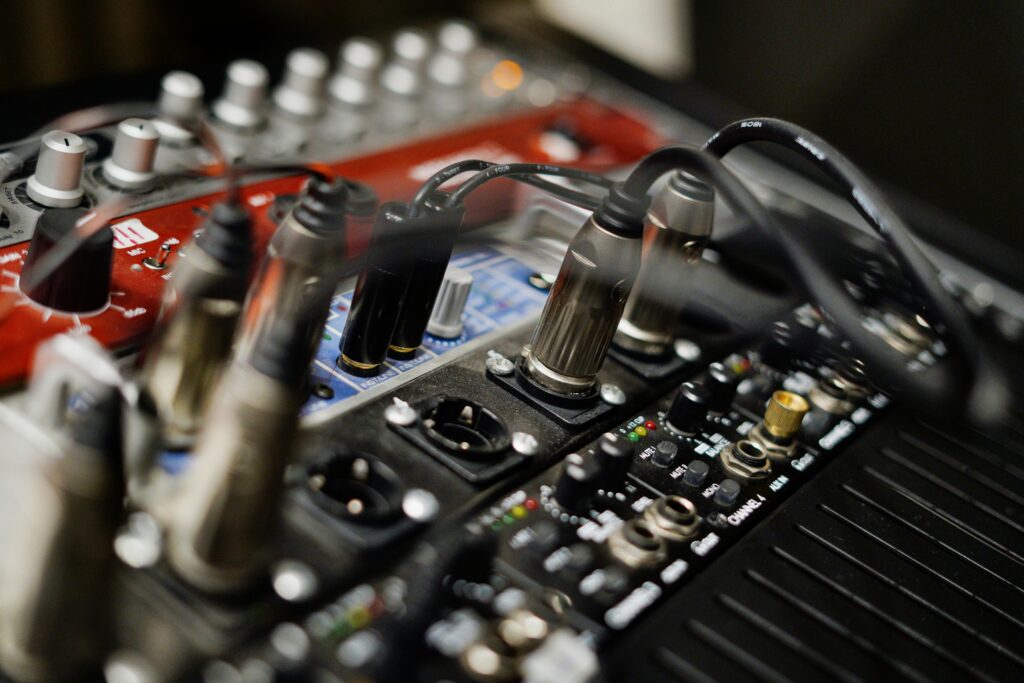
Audio connectors come in various forms, each with its specific use. RCA connectors are common for stereo audio; they come in pairs, usually red and white, for left and right audio channels. For professional setups, you might see XLR connectors, known for their ability to reduce noise, providing clean audio signals.
Banana plugs and binding posts are often used for connecting speakers, famous for their secure connections and durability. They ensure a tight fit, which is essential for maintaining sound quality during playback. You might also encounter specialized connectors in certain high-end systems, crafted for specific equipment to maximize performance.
Achieving High-Quality Sound
Choosing the right connector can significantly impact sound quality. A secure connection minimizes signal loss and interference, so always look for connectors that fit snugly. Durable materials in connectors can enhance longevity and ensure stable performance over time, contributing to overall sound clarity.
High-quality connectors, like XLR, are designed to handle noise better, offering superior sound output. Even something as small as using proper banana plugs for speakers can improve how sound travels from your receiver to the speakers, ensuring your audio is crisp and immersive. Although connectors might seem small, they are integral to achieving a flawless home theater sound experience.
Integrating Audio and Video Signals
When setting up a home theater, it's important to ensure that audio and video signals work together seamlessly. Using the right connectors can enhance your entertainment experience by maintaining quality and compatibility.
The Role of HDMI in Home Theaters
HDMI cables are key for handling both audio and video signals. They support high-definition video and multi-channel surround sound, making them perfect for your home theater. HDMI's ability to transmit digital signals helps keep both audio and video crisp and clear.
Another great feature of HDMI is the Audio Return Channel (ARC). This allows you to send audio from your TV back to a receiver or soundbar. With ARC, you can reduce cable clutter and simplify your setup. Newer HDMI versions offer even more improvements like 4K resolution and High Dynamic Range (HDR), enhancing your viewing and listening experience.
Balancing Audio-Video Compatibility
For your home theater to shine, balancing audio and video compatibility is crucial. Different connectors like RCA, composite video, and HDMI are often needed. HDMI is usually preferred due to its high quality. However, older equipment might still require RCA or composite video connections.
When dealing with various devices, double-check the compatibility of your connectors. Some speakers or displays may not support certain formats, which can lead to unexpected issues. Adapting to these differences might mean using additional equipment like adapters or converters. By managing these compatibility challenges, you ensure that both audio and video play well together, offering you a seamless home theater experience.
Optimizing Speaker Performance
To achieve the best sound in your home theater, consider the type of speaker wire used, proper speaker placement, and the integration of subwoofers and surround sound systems. These elements work together to boost audio quality.
Selecting the Right Speaker Wire
Good speaker wire is important for clear sound. When picking your wire, look at the gauge. Thicker wire usually means better sound quality. For longer distances, use wire with a lower gauge number.
Copper is a common material for wires. It's a good conductor of electricity. Ensure the wire is long enough to reach each speaker from your audio source without adding tension. Remember, tightly coiling extra wire may cause interference.
Speaker Placement Fundamentals
Where you put your speakers changes how they sound. Your front speakers should be at ear level when seated. Angle them toward the listening area, keeping them equidistant from the TV. This aids in creating the best soundstage.
Height and angle are key details. Rear speakers enhance surround sound. Place them slightly above ear level for a fuller audio effect. Ensure nothing blocks your speakers to avoid muffled sound.
Subwoofers and Surround Sound
Subwoofers add depth to your audio by handling low-frequency sounds. Place them carefully. Their location can greatly affect bass response. Experiment by moving them a bit at a time to find spots where bass sounds best.
Surround sound systems require good speaker placement. When setting up, balance the power output across speakers to ensure even sound. A well-positioned subwoofer complements the surround setup by adding depth, making movies and music come alive.

[Photo by ROMBO]
Enhancing Audio with Amplifiers and Cables
To improve your home theater's sound, focus on choosing the right amplifiers and using quality cables. These components help maintain signal integrity, reduce signal loss, and ensure clear, powerful audio.
Choosing Amplifiers for Home Theaters
Amplifiers boost audio signals, making them stronger and clearer. For a home theater, you need an amplifier that can handle both power and quality. Consider the number of channels it supports. This tells you how many speakers you can connect.
Look for an amplifier with matching power and impedance to your speakers to avoid damage. Some amplifiers have built-in sound processors. These can enhance sound by managing different audio formats. Choose an amplifier that suits your needs and space, whether you want a subtle boost or a cinematic impact.
Cables: The Lifeline of Clear Audio
Cables connect audio equipment, carrying signals between devices. Quality cables prevent signal loss. RCA cables are common for carrying audio signals. They're reliable but can sometimes lose signal with long lengths.
Use speaker cables with the right gauge for your setup. Thicker cables are better for longer distances. This improves sound quality and power delivery. Keep cables as short as possible to reduce loss. Consider high-quality cables with better shielding. This protects against interference and maintains signal integrity, so your audio stays crisp and clear.
Advanced Audio Technologies and Formats
Understanding advanced audio technologies and formats can greatly enhance your home theater experience. Modern audio formats like Dolby Atmos and DTS create immersive soundscapes, while high-resolution audio formats provide crystal-clear sound.
Exploring High-Resolution Audio Formats
High-resolution audio formats are designed to deliver the best possible audio quality. FLAC (Free Lossless Audio Codec) and WAV (Waveform Audio File Format) are popular choices because they preserve the full detail of the original recording.
PCM (Pulse Code Modulation) is another format that offers high-quality audio. It’s used in CDs and captures audio in a straightforward, uncompressed way. High-resolution audio formats often provide a richer and more dynamic listening experience, ideal for music enthusiasts who want to hear every detail.
If you’re seeking superior audio quality, consider exploring these formats, as they can significantly improve the way you enjoy music and movies at home.
The Impact of Audio Formats on Sound
Different audio formats can change how you experience sound in your home theater. Dolby Atmos is a game-changer, adding height channels to create a 3D audio effect. This technology makes sound appear to move around you, providing a more realistic experience.
DTS is similar but offers more flexibility in speaker setup, adapting audio to fit your existing equipment. Dolby Digital remains a popular choice for many due to its balance of quality and compatibility.
When setting up your system, the choice of audio format affects how sounds are projected and how immersive the experience is. The right audio format can transform your home into a true theater, enhancing all your audio visual content.
Setting Up a Home Theater System
Creating a home theater system means balancing space, budget, and technology. Think about how to arrange your room, manage your budget wisely, and integrate various audio sources for the best sound performance.
Home Theater Layout and Design
Start by deciding the best location for your home theater setup. Consider your room's size and shape when placing speakers, screens, and seats. Surround sound speakers need careful positioning for optimal sound effects. Front speakers usually go near the TV, while rear speakers should be placed behind the seating area. Keep enough distance from the walls to prevent sound distortion.
Divide your room into zones if your system supports it, allowing different audio experiences in separate areas. This might involve additional speakers or components. Ensuring your seating is positioned for comfort and optimal sound will enhance your overall viewing experience.
Budgeting for Your Audio Setup
When planning your home theater budget, list the key components you need, such as speakers, a receiver, and a TV or projector. A basic system might include fewer speakers, while a high-end system could feature multiple audio zones and premium equipment.
Consider the cost of cables and accessories, but don't let them eat into your main budget. These are crucial for connecting everything smoothly. Some brands offer bundled packages that might save you money. Expect to allocate some funds to power management and possible acoustic treatments to improve sound quality.
From Turntables to Streaming: Managing Audio Sources
A diverse audio setup might involve various sources, from classic vinyl turntables to modern streaming services. For physical media like blu-ray players, ensure you have the right connections—often HDMI cables for the best quality sound and video.When using streaming services, a stable home network is essential to avoid disruptions. Some systems allow seamless switching between audio sources, so configure your receiver to manage all inputs smoothly. Include options like Bluetooth or Wi-Fi connectivity for added flexibility, allowing you to easily stream from your devices without constant re-cabling.